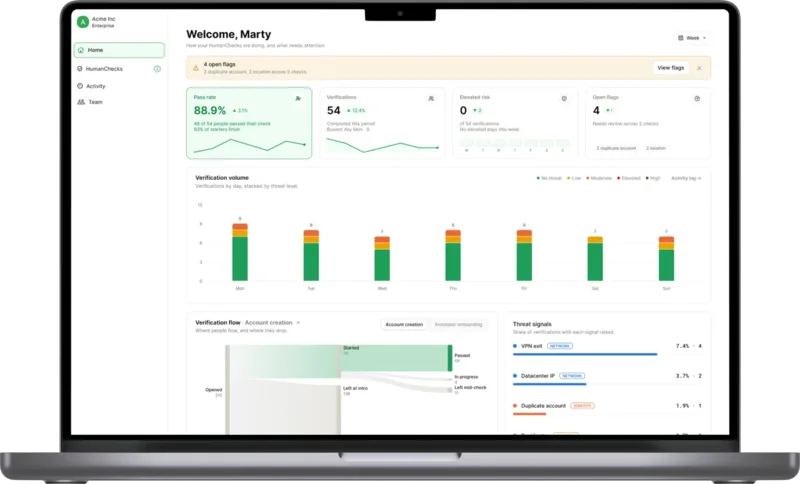
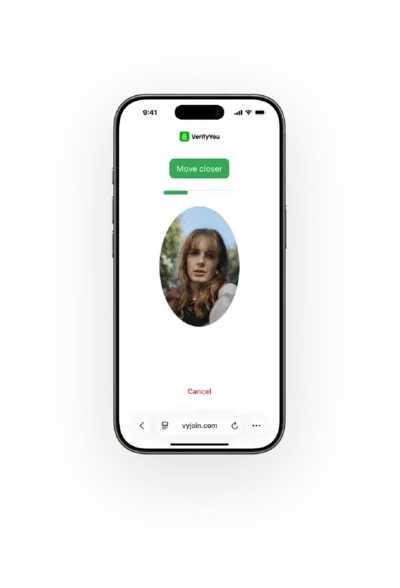
Once you can see agent traffic, proof of agent lets you welcome the agents that bring business and hold the actions that matter for the one real, unique person behind each agent. AgentCheck, in early access, runs it on your site.
Agent traffic
AI agents are skewing your traffic.Get a true read first.
Passive signals show how much of your traffic is human and how much is automated, AI agents included.
The problem
You can't act on traffic you can't see.
AI agents now browse, compare, sign up and buy for people, and your analytics count them as visitors, because they aren't on a known-bot list. Until you can separate human from bot traffic, every metric mixes people with software.
- Checkout funnelSessions8,200Abandoned carts3,100Human or automatedUnknown
Metrics that mix people and agents
Visits, sessions, sign-ups and conversion rates count agents as visitors, so a campaign or a page change looks better or worse than it did with people.
- Today's visitsSAShopping agentSays soBVBrowser visitLooks humanBVBrowser visitLooks human
Agents that act like people
Some agents identify themselves with a signed request or a known user agent. Many act like a person's browser, so most bot detection and analytics treat them as human.
- Agent policyBlock every agentLost salesAllow every agentOpen to abuse
Block all or allow all
Without a read on agent traffic, the choice is blocking every agent and losing the business they bring, or allowing every agent and the abuse some of them carry.
How it works
Get a true read, then decide what agents may do
01
See your real traffic
Drop one pixel and passive signals read every visit in the background, so you see how much of your traffic is human and how much is automated, AI agents included. It runs in shadow mode, so nothing changes for your visitors.
02
Read your numbers for people
With the split in hand, read your funnels, campaigns and sign-ups knowing how much of each is automated, before you change a page or a budget.
03
Decide what agents may do
Then choose what agents can do on each action with AgentCheck, in early access: allow them, ask the real, unique person behind them to approve with a quick, anonymous HumanCheck, or block.
Traffic report, example site
HUHumanVisits from people61%
AUAutomatedAI agents included34%
?Not enough to tell5%
ModeShadow, nothing blocked
Step two
Proof of agent is what you do with the agents you find.
The platform
Start with the signals, then add the person.
Why now
Agent traffic keeps growing. Most sites still block it.
In a16z's "Welcome to the B2A economy," Olivia Moore and Justine Moore write that most enterprises still block agent traffic over fraud and chargeback concerns, and that they'll have to embrace "an increasingly valuable wave."
a16z, Olivia Moore and Justine Moore, 11 November 2026Blocking every agent or allowing every agent both start from a guess. Start with the read: put the pixel on your site and see how much of your traffic is automated before you change anything.






A solution for every scenario
Let's talk trust
Start with a free pilot: see what the check catches on your own users, with no dev work to begin.
With tools like VerifyYou, AI becomes a force for good. It helps prevent AI-driven fraud and can be done with much lower friction than what we built over the years.
Built by humans from
- Quora
- Square
- Gusto
- Cohere Health
- Accenture
Security
Privacy and security in every decision
We keep a face code, not the photo, and hold it under SOC 2 Type II and ISO 27001:2022 compliant controls.
No images stored. VerifyYou does not store images.
No ID or documents. HumanCheck anonymously confirms there is a real, live, unique person, with no name or ID.
A face code, not a photo. We treat it as sensitive biometric data.
 SOC 2 Type II
 ISO 27001:2022
 ISO/IEC 30107-3 PAD Level 1 & 2
 GDPR compliant
Common questions
What is agentic traffic?
Agentic traffic is visits from AI agents acting for people: browsing, comparing prices, filling in forms, signing up or checking out on someone's behalf. Some agents identify themselves with a signed request or a known user agent. Others act like a person's browser, so they show up in your analytics as visitors.
How do I identify bot traffic in Google Analytics 4?
Google Analytics 4 automatically excludes known bots and spiders, using Google's research and the IAB's International Spiders and Bots List. You can't turn that off, and you can't see how much it removed. An AI agent working inside a real browser isn't on a known-bot list, so it's counted as a user. Passive signals read every visit on your site and report how much of your traffic is human and how much is automated, AI agents included, alongside your analytics.
How much of my website traffic is bots?
It differs from site to site, and industry-wide figures on human versus bot traffic won't tell you yours. Add the pixel and passive signals report your own split in shadow mode: human, automated (AI agents included), and not enough to tell.
Should websites block AI agents?
Blocking every agent turns away the customers who send them, and allowing every agent leaves the door open to abuse. Start by measuring how much of your traffic is automated, then decide action by action with proof of agent.
Can passive signals tell me which agent it is?
No. Passive signals report agents as automated traffic, without naming the agent or separating agents from other bots. Recognizing a declared agent by name, and setting what it may do on each action, is part of AgentCheck, now in early access.
Do my visitors notice anything?
No. The pixel reads every visit in the background, with no puzzle and no selfie. It starts in shadow mode, so you get the report and nothing gets blocked.
Is this bot blocking?
It comes one step before blocking. You first see how much of your traffic is human and how much is automated, so any decision to block, allow or ask for a person's approval rests on your own numbers.
What do we do with agent traffic once we can see it?
Decide action by action. Some agents bring real customers, so blocking all of them loses business. With proof of agent you can let agents browse, hold actions like checkout until the real, unique person behind the agent approves with a quick, anonymous HumanCheck, or block an action outright.
Do you store photos of our users?
No. We keep a face code, not your users' images.
How much work is it to add?
It's two API calls: one to start the check and one to read the result.
Do we have to replace our KYC or bot tools?
No. It sits on top of your stack, so you keep your KYC and bot tools.
What does it cost?
It's 50 to 100 times cheaper than KYC. You pay per check, and nobody uploads an ID document.
Resources
Keep learning

Blog
How to find bot and AI agent traffic in Google Analytics 4
Google Analytics 4 removes bots on a known list, so AI agents browsing in a real browser are counted as your users. Here's how to spot them in GA4, where GA4 stops, and how to get a true read of your traffic.
Read the post
Blog
Your Fraud Check Is Blocking Your Most Valuable Participants
Senior B2B participants work behind corporate networks and managed laptops, which can look like fraud to a passive check. A live check on the person keeps them in the study.
Read the post
Blog
How to Stop Ban Evaders From Rejoining Your Platform
Bans attached to accounts, emails, phone numbers and devices expire the moment an evader resets them. A ban attached to a verified person survives the reset, and that changes what enforcement can actually hold.
Read the post
Ready to get started?
VerifyYou scales trust: passive signals on every session, a face check only when risk calls for it.